
Download
Install Textmolt in Word.
You install one Word add-in. If you use Zotero, you also install Viamolt, a small app that runs on your computer and connects Word to your library.
- Version
- 0.28.0 · released 12 Nov 2026
- Works with
- Word on Windows: Microsoft 365, Office 2021 or later, Office 2019 Retail. Word for Mac: Preview.
- Price
- Free to download and free to start
What to install
On Windows
-
Textmolt for Word
The add-in that puts the Textmolt tab and sidebar in Word.
Downloadtextmolt-v0.28.0-word-setup.zip
Or the installer (.exe)textmolt-v0.28.0-word-setup.exe · 1.96 MB
SHA-256
textmolt-v0.28.0-word-setup.zip
21d27aa403ce746eaf901dfa5bb216d4fe87f071f2fb247bbd7e33a03177f07btextmolt-v0.28.0-word-setup.exe
366e53075494f55c145504a16c8635edac87c0543fc4d3c4a03e15dcff5e2eaaCheck a download in PowerShell:
Get-FileHash -Algorithm SHA256 .\textmolt-v0.28.0-word-setup.zip - Download
viamolt-companion-v0.2.3-windows-x64.zip · 9.40 MB
SHA-256
viamolt-companion-v0.2.3-windows-x64.zip
38b469921659a18310b0b7dfb2e4d8d20b4cafe281f23f64a80cf29def135da6Check a download in PowerShell:
Get-FileHash -Algorithm SHA256 .\viamolt-companion-v0.2.3-windows-x64.zip

The downloads aren't code-signed yet: if your browser blocks one, choose Keep; if Windows SmartScreen appears, choose More info, then Run anyway.
On Mac
-
Textmolt for Word · Preview
Word for Mac loads the add-in from a manifest file that you save into Word's add-in folder.
Get the manifesttextmolt.xml
-
Viamolt for Mac · Preview
Links the Word add-in to the Zotero library on this Mac.
Downloadviamolt-companion-v0.2.3-macos-arm64.dmg · 16.24 MB
SHA-256
viamolt-companion-v0.2.3-macos-arm64.dmg
6bc2064f027a7d4cf1f3d1e31b740f28f50fca587978d30194abb0c559c7352cCheck a download in Terminal:
shasum -a 256 viamolt-companion-v0.2.3-macos-arm64.dmg
The Mac version is currently a preview.
Install and set up
On Windows
-
Install the add-in
Right-click textmolt-v0.28.0-word-setup.zip, choose Extract All, then click Extract. In the extracted folder, right-click install.bat, then choose Run as administrator. It registers the add-in folder with Office, and Windows SmartScreen doesn't appear.
Prefer the .exe installer?
Double-click textmolt-v0.28.0-word-setup.exe. It isn't code-signed yet, so if SmartScreen appears, choose More info, then Run anyway. It installs for your Windows user only.
Windows asks for another account's password?
On a standard Windows account, cancel that prompt, then double-click install.bat instead. It asks for an administrator only to create the shared folder.
-
Turn it on in Word (one time)
On the Home tab, click Add-ins, then More Add-ins at the bottom of the panel.
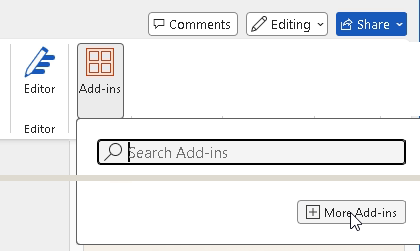
Fig. 1 The Add-ins panel on the Home tab. More Add-ins is at the bottom. In the Office Add-ins dialog, open SHARED FOLDER, select Textmolt and click Add. From then on the Textmolt tab loads by itself.
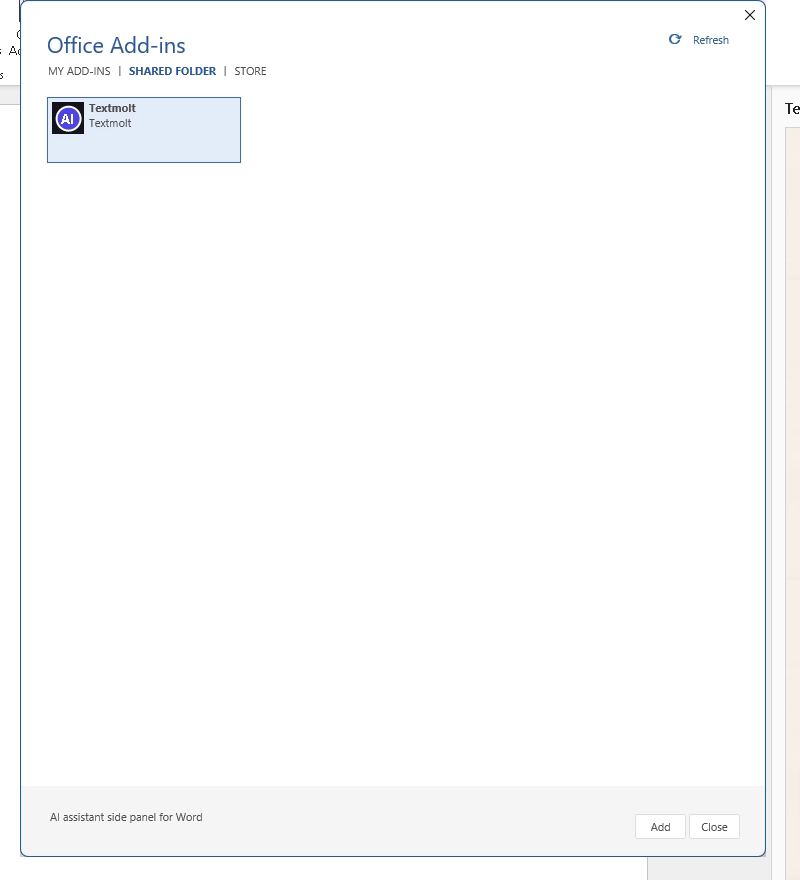
Fig. 2 The Shared Folder tab of the Office Add-ins dialog, with Textmolt selected. No Add-ins button on the Home tab?
Older versions of Word open the same dialog from the Developer tab. Turn the tab on under File → Options → Customize Ribbon by ticking Developer, then click Developer → Add-ins and continue in the Office Add-ins dialog as above.
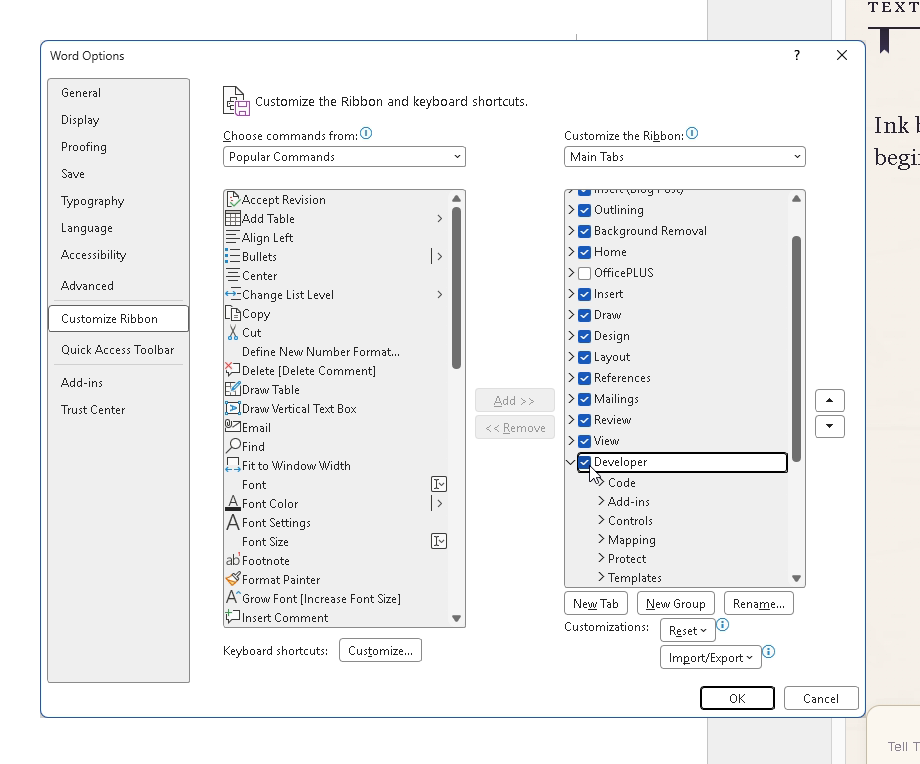
Fig. 3 Word Options → Customize Ribbon, with Developer ticked. 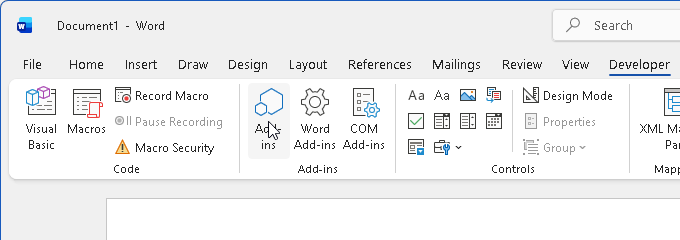
Fig. 4 The Add-ins button on the Developer tab. -
Open the sidebar and sign in
Click Textmolt → Open Sidebar, then enter your email and the 6-digit code we send. A new account is created the same way.
-
Connect Zotero (optional)
Right-click viamolt-companion-v0.2.3-windows-x64.zip, choose Extract All, then double-click Viamolt-Companion-0.2.3-setup.exe in the extracted folder. Keep Zotero running with Settings → Advanced → “Allow other applications on this computer to communicate with Zotero” turned on. In the sidebar, open Zotero library, click Get pairing code, enter the code in Viamolt, check that the account it shows is yours, then confirm.
Recorded in the real add-in · Word on Windows
The user guide covers each step in more detail, with fixes for common problems: Install in Word for Windows
On Mac
-
Save the manifest into Word's add-in folder
Click Get the manifest above: textmolt.xml is saved to your Downloads folder. In Finder, press Cmd + Shift + G, go to ~/Library/Containers/com.microsoft.Word/Data/Documents/wef, and drag textmolt.xml from Downloads into that wef folder.
Finder says the folder doesn't exist?
Go to ~/Library/Containers/com.microsoft.Word/Data/Documents first, create a folder named wef (all lowercase) inside it, then drag textmolt.xml in. The name must stay textmolt.xml, not textmolt.xml.txt.
-
Quit Word completely, then open it again
In Word, press Cmd + Q, then open Word again. A Textmolt tab appears on the ribbon.
-
Open the sidebar and sign in
Click Textmolt → Open Sidebar, then enter your email and the 6-digit code we send.
-
Install Viamolt (optional)
Double-click viamolt-companion-v0.2.3-macos-arm64.dmg and drag Viamolt Companion into Applications. The first time you open it, go to System Settings → Privacy & Security and click Open Anyway.
Is it working?
- A Textmolt tab appears on Word's ribbon.
- Clicking Textmolt → Open Sidebar opens the sidebar on the right, with a way to sign in.
- If you use Zotero: the Zotero library panel reads Connected to local Zotero at the bottom.
System requirements
On Windows
| Operating system | Windows 10 or later |
|---|---|
| Office | Microsoft 365, Office 2021 or later, or Office 2019 Retail |
| Internet connection | Required: the sidebar and every AI request run through our servers |
| Zotero features | Zotero 7–10 running on the same PC, plus Viamolt |
On Mac
| Word | Word for Mac |
|---|---|
| Internet connection | Required: the sidebar and every AI request run through our servers |
| Zotero features | Zotero running on the same Mac, plus Viamolt for Mac (Apple silicon) |
WPS Office isn't supported, on Windows or on Mac.
Updates and uninstalling
On Windows
Updates
The sidebar loads from our servers, so most updates arrive when you reopen it. If the sidebar asks you to update the installed add-in, download the new installer and run it the same way, then in Word open Shared Folder, click Refresh, select Textmolt, click Add and reopen the sidebar.
Uninstall
Open Windows Settings → Apps → Installed apps and uninstall Textmolt for Word. Or, in the extracted folder, right-click uninstall.bat, then choose Run as administrator.
On Mac
Updates
The sidebar loads from our servers, so updates arrive when you reopen it.
Uninstall
Delete textmolt.xml from the wef folder, then press Cmd + Q and reopen Word. For Viamolt, click its icon in the menu bar and choose Quit, then drag Viamolt Companion from Applications to the Trash.
If something doesn't work
On Windows
The Shared Folder tab is empty
install.bat probably didn't run as administrator. Right-click install.bat again, choose Run as administrator, restart Word and repeat step 2. If the tab is still empty, the user guide shows how to add the add-in folder to Word yourself. Add the folder to Word yourself
Setup finished, but Textmolt isn't in my Word
On a standard Windows account, entering another account's administrator password makes setup install for that account instead of you. Install again as yourself: double-click the .exe installer, or double-click install.bat without choosing Run as administrator.
The sidebar is blank
Install Microsoft's WebView2 Runtime (Evergreen Standalone, x64) and restart Word. Office 2019 Volume License and Office 2016 or earlier can't run the add-in, and WebView2 won't help there; they need Microsoft 365 or Office 2021 or later.
Questions
Is Textmolt free?
Free to download and free to start: quick edits, asking AI and reading stay free for good. Pro adds the whole research workflow — see Pricing on the home page.
Do I need Viamolt?
Only for the Zotero features: searching your library, citing from it and saving papers to it. Everything else works with the Word add-in alone.
ZIP or installer?
On Windows, either works. The ZIP doesn't trigger SmartScreen but asks for administrator approval to create its shared folder. The .exe installs for your Windows user only, but isn't code-signed yet.
Why aren't the downloads code-signed?
Signing is on our list. Until then, every file's SHA-256 checksum is published on this page so you can confirm your download is exactly what we built.